CHAIR HOW-TO: Import Assignments (Senior Meta-Reviewer)
The Chair may elect to import assignments for Senior Meta-Reviewers.
PREREQUISITE
The roles of Senior Meta-Reviewer are pre-assigned. If the user is not assigned the proper role, the upload will fail.
OVERVIEW
The Senior Meta-Reviewers can be assigned one of 2 ways; by paper or through Meta-Reviewer.
ASSIGNING BY PAPER
SENIOR META-REVIEWER SETTINGS PAGE
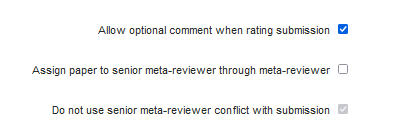
- Disable the 'Assign paper to senior meta-reviewer through meta-reviewer' setting. Save the changes.
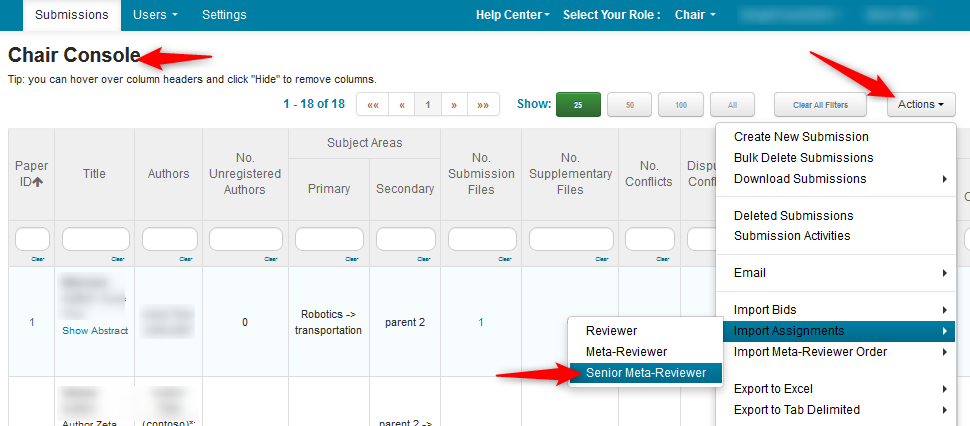
CHAIR CONSOLE
- Navigate to the 'Chair Console' page and select Actions>Import>Assignments.
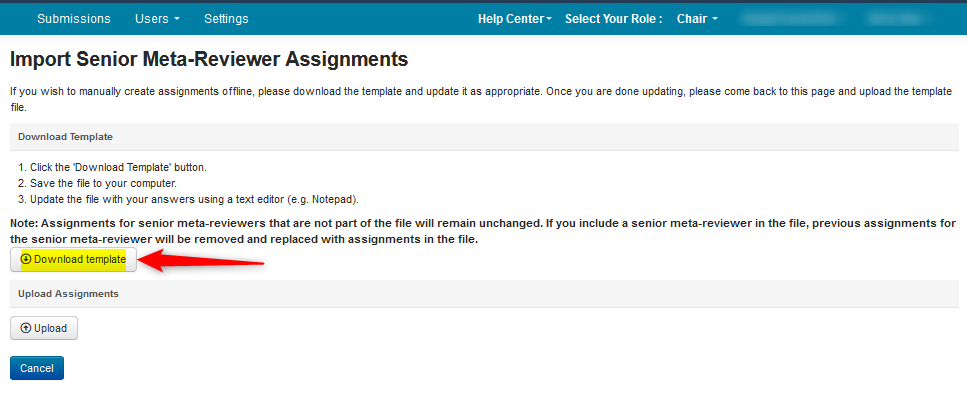
IMPORT SENIOR META-REVIEWER ASSIGNMENTS PAGE
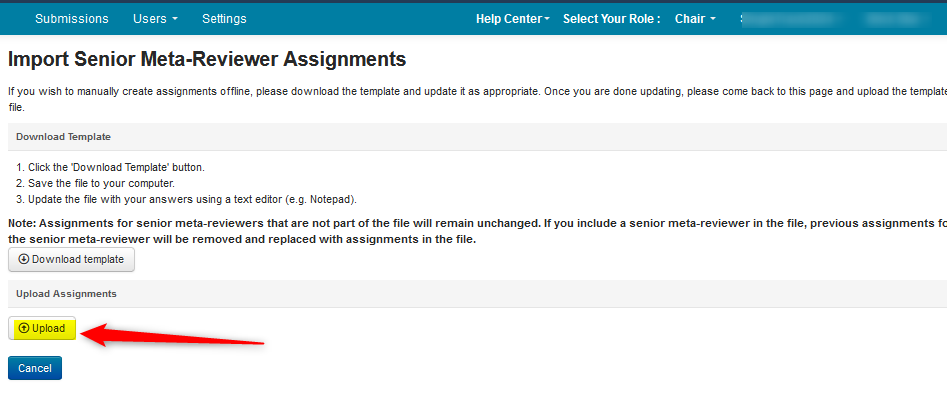
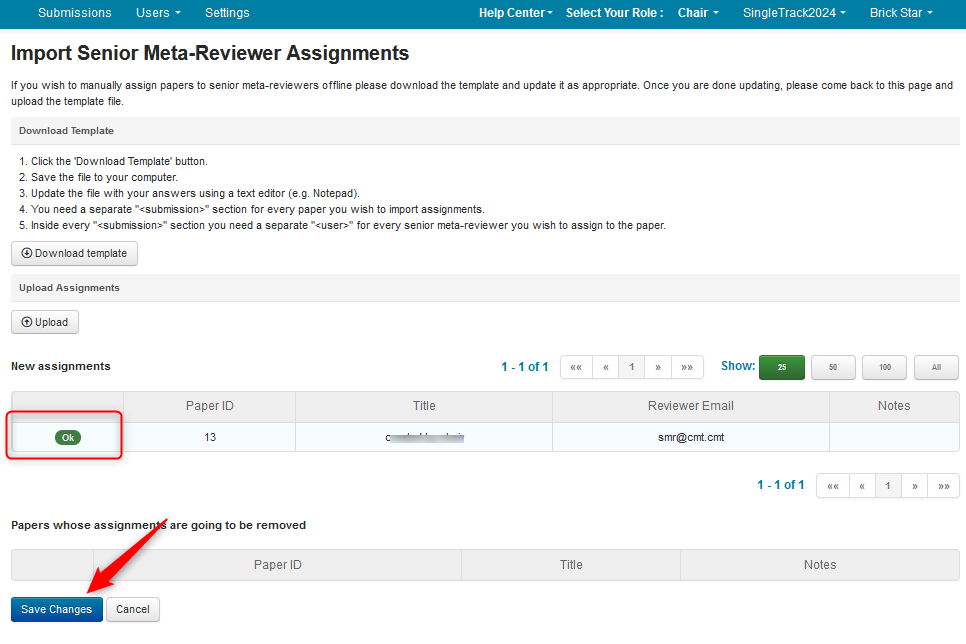
- The 'Import Senior Meta-Reviewer Assignments' page opens. Click ‘Download Template.’ An XML file will be downloaded.
XML FILE
- Open the file with a text editor like Notepad++.
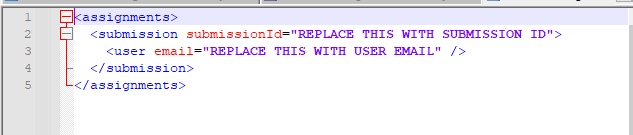
- Where it says, ‘< submission submissionId="REPLACE THIS WITH SUBMISSION ID">‘ enter the Submission ID between the quotes. In this case Paper ID 13.
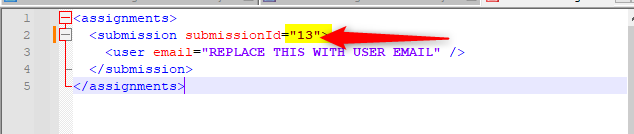
- Where it says, ‘< user email="REPLACE THIS WITH USER EMAIL" />’ enter the user email of the Senior Meta-Reviewer between the quotes. Save the xml.

IMPORT SENIOR META-REVIEWER ASSIGNMENTS PAGE
- In the 'Import Senior Meta-Reviewer Assignments' page click 'Upload'
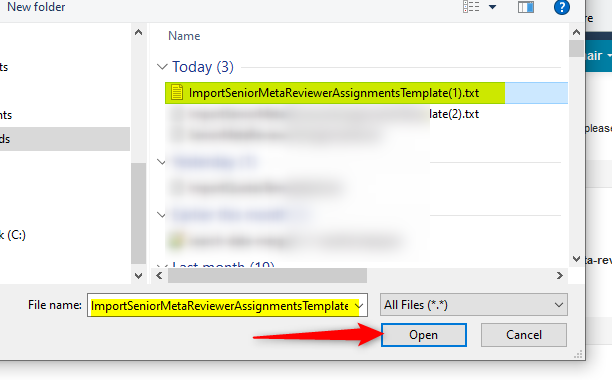
- Find the file and click 'Open'
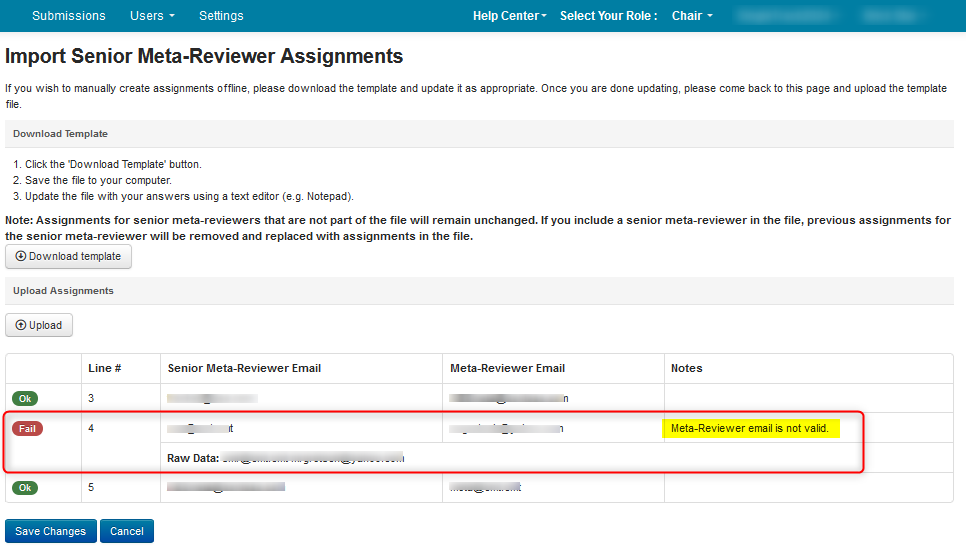
- Verify the upload was imported correctly by the green 'OK' designation for each row. Save the changes.
ASSIGNING MULTIPLE SENIOR META-REVIEWERS PER PAPER
Sometimes the Chair will want more than 1 Senior Meta-Reviewer for a particular paper.
- Click ‘Download Template’ from the 'Import Senior Meta-Reviewers' page as shown above and open the file with a text editor like Notepad++.
- Copy and paste this section -
- for as many Senior Meta-Reviewers you want assigned to the paper. In this case 3 Senior Meta-Reviewers:

- Enter the Paper ID and the email of each Senior Meta-Reviewer. Save the xml file. Then upload the xml to the 'Import Senior Meta-Reviewers' page as shown above.

ASSIGNING MULTIPLE SENIOR META-REVIEWERS, MULTIPLE PAPERS
To import assignments of multiple Senior Meta-Reviewers for multiple papers, the procedure is largely the same. For the below scenario, we will have 3 Meta-Reviewers for 3 papers.
- Download the ‘Assignments Template’, as shown above, and open the file with a text editor like Notepad++.
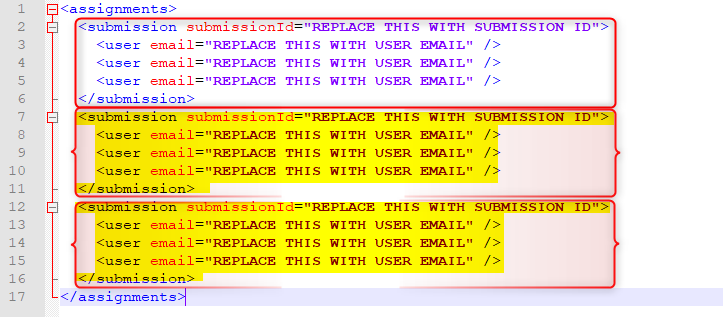
- Copy and paste this section -
- for as many Senior Meta-Reviewers you want assigned to the paper. In this case 3 Senior Meta-Reviewers:
- Now copy, then paste this whole section twice.
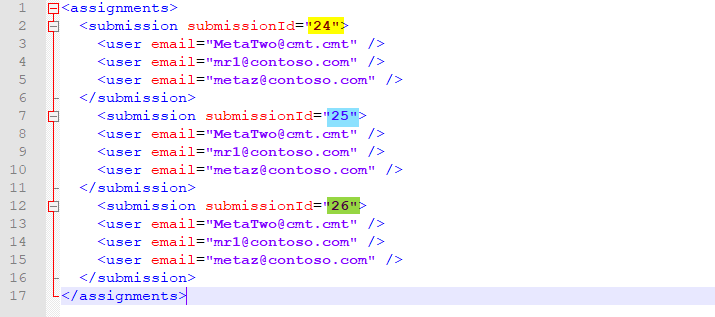
- Enter the Paper IDs and the email of each Senior Meta-Reviewer, save the xml file and upload the xml to the 'Import Senior Meta-Reviewers' page as shown above.
Note
If another Senior Meta-Reviewer Assignment Template xml is uploaded, the other Senior Meta-Reviewers must be included in the xml or they will be overwritten.
ASSIGNING SENIOR META-REVIEWER THROUGH META-REVIEWER
SENIOR META-REVIEWER SETTINGS PAGE
- Enable the 'Assign paper to senior meta-reviewer through meta-reviewer' setting. Save the changes.

MANAGE SENIOR META-REVIEWERS PAGE
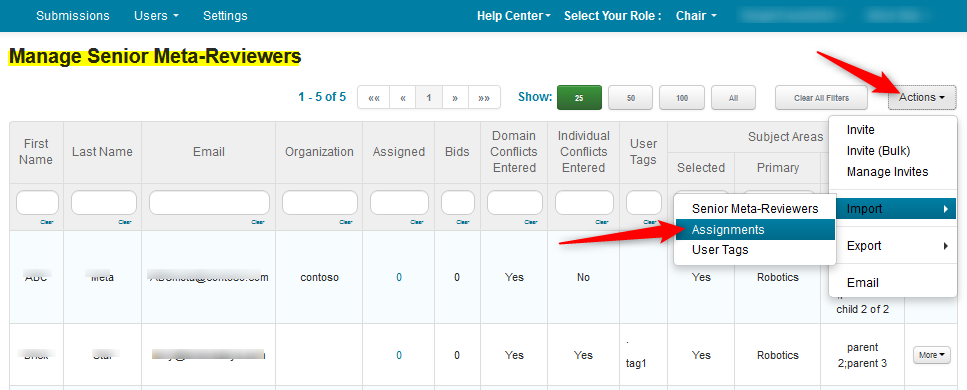
- Navigate to the 'Manage Senior Meta-Reviewers' page and select Actions>Import>Assignments.
IMPORT SENIOR META-REVIEWER ASSIGNMENTS PAGE
- The 'Import Senior Meta-Reviewer Assignments' page opens. Click ‘Download Template.’
- Open the file with a text editor
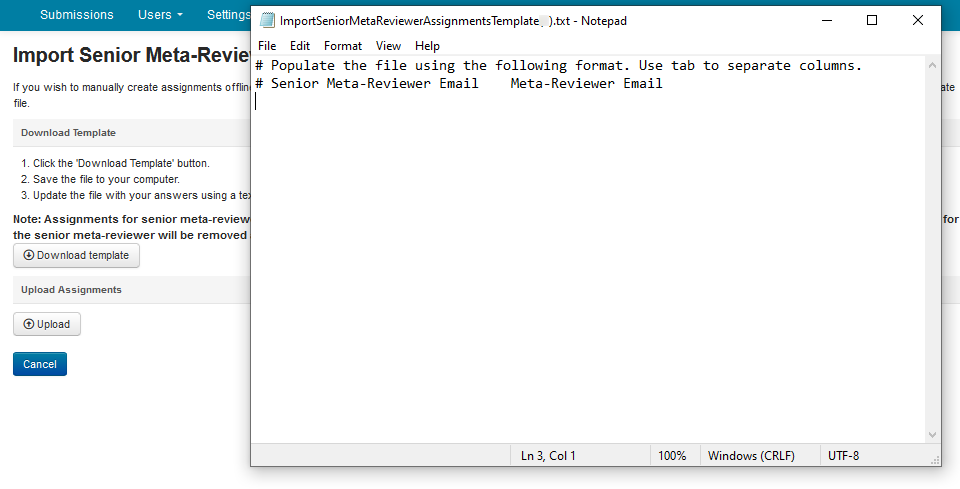
- Enter the Senior Meta-Reviewer email (highlighted in yellow) then tab and enter the Meta-Reviewer email (highlighted in blue) and save the file.
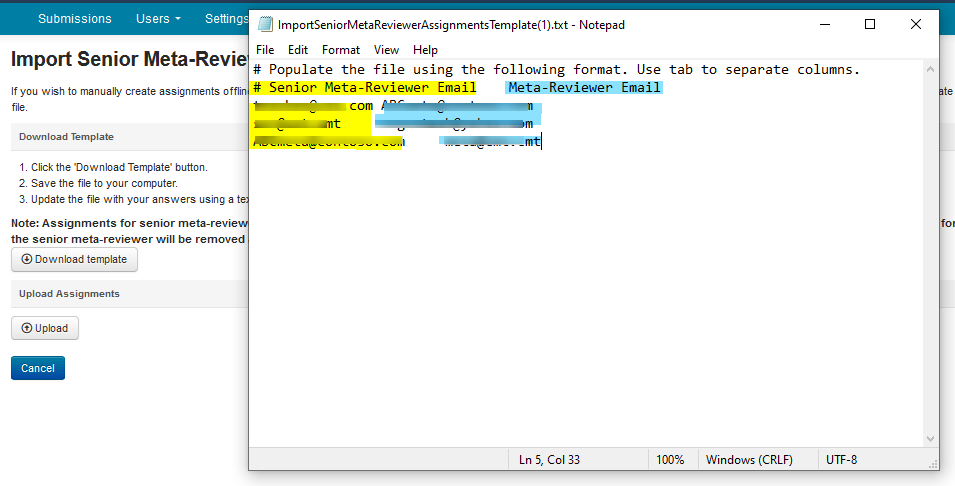
- In the 'Import Senior Meta-Reviewer Assignments' page click 'Upload'
- Find the file and click 'Open'
- Verify the upload was imported correctly by the green 'OK' designation for each row. Save the changes.
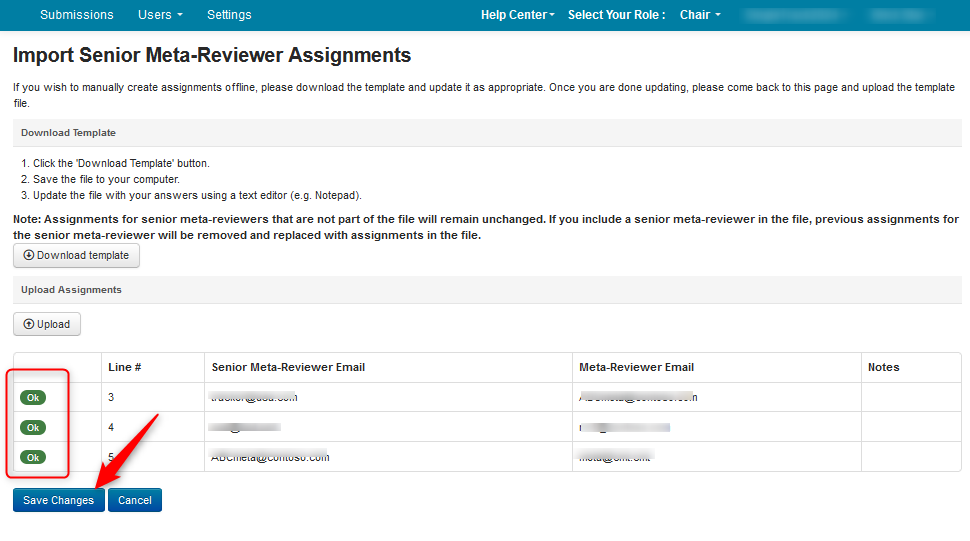
If there were someting uploaded incorrectly, the 'Import Senior Meta-Reviewer Assignments' page will show this by a red 'Fail' preceeding the row. It will also give an explanation of the error in the Notes column.