SCENARIO: Some Authors Can View Reviews
OVERVIEW
Some Chairs may want Authors to see completed Reviews while the Review phase is still ongoing.
This is done via Paper Status.
All Authors will see Paper Status; designated Authors will see Paper Status and Reviews.
PRE-REQUISITE
Review (and Meta-Review) forms have 'Visible to authors after author notification' enabled.
This is so authors are able to see Reviewers' (and Meta-Reviewers') answers when configured.
AUTHORS SEE STATUS ONLY – NO REVIEWS
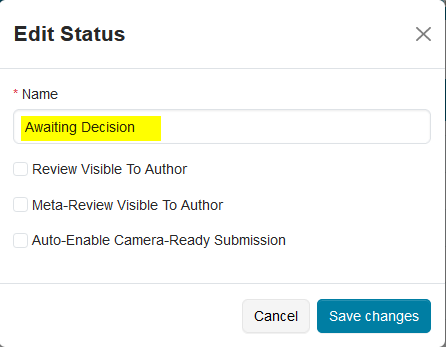
Paper status = ‘Awaiting Decision’
• Review Visible to Author = disabled
• Meta-Review Visible to Author = disabled
Timeline Activities = Author Notification
• Status = Completed
• Deadline = [date in the past]

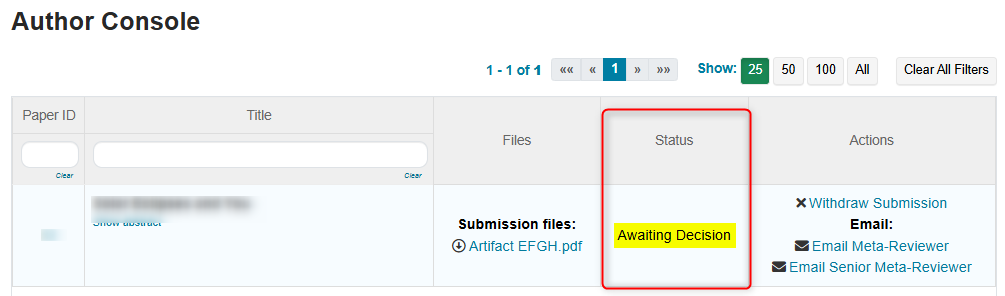
Author Console:
• Status = ‘Awaiting Decision’
• Reviews = [not visible]
• Meta-Reviews = [not visible]
AUTHORS SEE STATUS – WITH REVIEWS
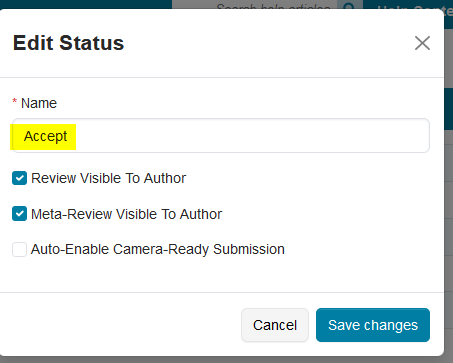
Paper status = ‘Accept’
• Review Visible to Author = enabled
• Meta-Review Visible to Author = enabled
Timeline Activities = Author Notification
• Status = Completed
• Deadline = [date in the past]
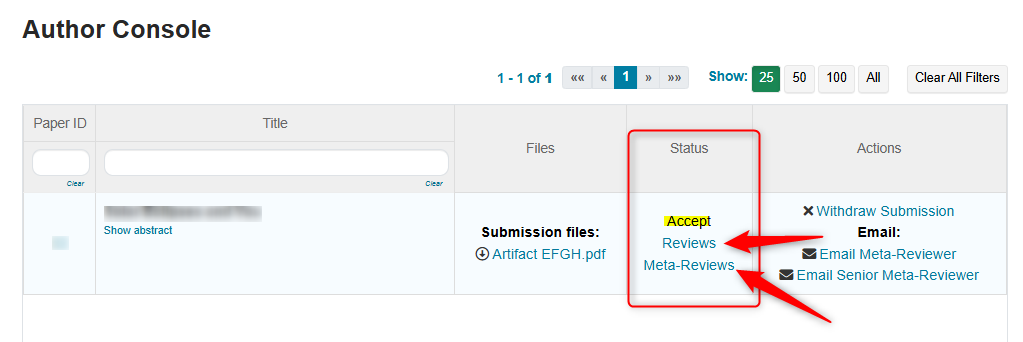
Author Console:
• Status = ‘Accept’
• Reviews = [LINK visible]
• Meta-Reviews = [LINK visible]
If Meta-Reviews are not to be visible at this time, disable ‘Meta-Review Visible to Author’ in the ‘Accept’ paper status and save changes.